
Aaajl GCash Deposit & Withdrawal Guide: ₱50 Cash-In & 5-Minute Payouts
Deposit from ₱50 and withdraw within 5 minutes via GCash at Aaajl. Step-by-step cashier walkthrough, zero service fees, and 24/7 automated transaction support.
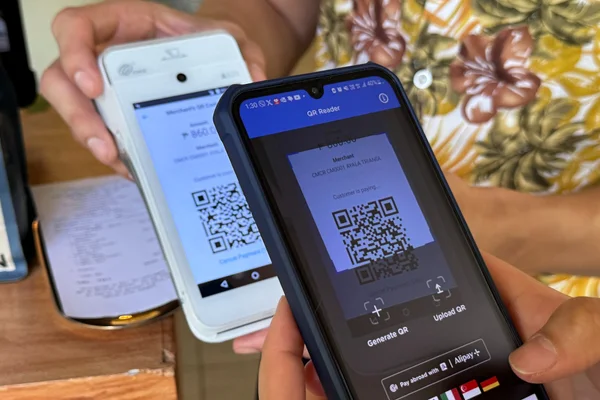
GCash is the undisputed payment method of choice for online gaming in the Philippines, providing millions of Filipinos with accessible, instant, and secure digital money transfers. At Aaajl, the financial gateway is engineered to support direct, automated GCash transactions with an accessible entry threshold of just ₱50 minimum deposit and 0% service deduction. Whether you are loading your bankroll to spin JILI Fortune Gems 2 or withdrawing your latest jackpot win, this exhaustive tutorial explains how to navigate the GCash cashier at aaajl88.net, avoid common transfer mistakes, and resolve delays quickly.
Aaajl GCash Financial Matrix
| Transaction Parameter | Cash-In (Deposit) Rules | Cash-Out (Withdrawal) Rules |
|---|---|---|
| Minimum Amount | ₱50 per transaction | ₱100 per transaction |
| Maximum Single Limit | ₱50,000 per transaction | ₱50,000 per transaction |
| Daily Cumulative Limit | Unlimited transactions | ₱500,000 per day (Higher for VIP tiers) |
| Processing Speed | Instant (30 to 90 Seconds) | 3 to 10 Minutes Average |
| Service Transaction Fee | ₱0 (100% Free) | ₱0 (100% Free) |
| Mandatory Rollover | 1x on regular cash deposits | Requires completed KYC matching GCash name |
| Gateway Security | Dynamic Merchant QR Codes | TLS 1.3 / AES-256 Encrypted Tunnel |
Step-by-Step GCash Deposit Walkthrough (₱50 Minimum)
Depositing funds on Aaajl through GCash utilizes a dynamic, secure QR code system. Follow this step-by-step procedure to ensure your balance updates immediately:
Step 1: Open the Aaajl Cashier
Log in to your account at aaajl88.net from your mobile phone or computer. Tap the green Deposit button prominently located on the header navigation bar.
Step 2: Choose GCash QR Express
In the deposit payment options, select GCash QR Express. This method utilizes direct merchant gateway routing to automate crediting.
Step 3: Enter Deposit Sum
Type your chosen deposit amount into the box or tap one of the quick-select buttons (₱50, ₱100, ₱200, ₱500, ₱1,000, or ₱5,000). Remember that the minimum cash-in is only ₱50.
Step 4: Generate the Dynamic QR Code
Tap Proceed to Deposit. The cashier system will generate a unique, time-sensitive QR code on your screen accompanied by a countdown timer (typically 5 minutes). Take a clear screenshot of this QR code.
| Step # | Action / Process Flow | Operational Notes |
|---|---|---|
| Step 1 | Log in to aaajl88.net | Standard system progression |
| Step 2 | Click 'Deposit' > Select 'GCash' | Standard system progression |
| Step 3 | Input Amount | Min ₱50 |
| Step 4 | Screenshot Dynamic QR Code | Standard system progression |
| Step 5 | Open GCash App > Tap 'QR Scan' | Standard system progression |
| Step 6 | Upload Screenshot & Pay | Standard system progression |
| Step 7 | Balance Credited in 30-90 Seconds | Standard system progression |
Step 5: Scan & Pay via Your GCash App
- Open your official GCash app and log in with your 4-digit MPIN.
- Tap the QR Scan icon at the bottom of the home screen.
- Tap the Upload QR icon in the upper right corner and select the saved cashier screenshot from your photo gallery.
- Review the merchant name and total amount. Tap Pay.
- Save the digital GCash transaction receipt showing your Reference No..
Step 6: Confirmation & Balance Refresh
Switch back to your browser at aaajl88.net. Your balance will automatically update within 30 to 90 seconds. You are now ready to play!
Step-by-Step GCash Withdrawal Walkthrough (3–10 Minutes)
When you are ready to enjoy your winnings, cashing out to your personal GCash account is straightforward and fast:
Step 1: Verify Rollover Requirements
Before requesting a cash out, confirm that your playable balance has fulfilled the necessary turnover:
- Regular cash deposits require a standard 1x rollover (₱500 \text{ deposit} = ₱500 \text{ in total bets}).
- Promotional bonuses require their specific turnover (e.g., 15x for the Welcome Bonus or 5x for the Free ₱100). Check your rollover status under `Member Center > Rollover Overview`.
Step 2: Link Your Personal GCash Wallet
- Navigate to `Member Center > Withdraw > Add E-Wallet`.
- Select GCash.
- Enter your GCash Account Name (must match your registered Aaajl legal name).
- Enter your 11-digit GCash Number (e.g., `09XXXXXXXXX`).
- Confirm via SMS security OTP. Once bound, you will not need to enter these details for future cash outs.
Step 3: Submit Cash Out Request
- Enter the withdrawal amount (minimum ₱100, maximum ₱50,000 per request).
- Enter your 6-digit withdrawal security PIN.
- Tap Submit Withdrawal.
The automated payment processing system checks the request. Funds are dispatched directly to your GCash wallet within 3 to 10 minutes under standard network conditions.
Troubleshooting Common GCash Payment Issues
While GCash transactions are predominantly automated, occasional delays can occur due to telecom network lag or user error. Here is how to diagnose and resolve them:
1. Deposit Paid in GCash But Balance Not Credited
- Cause: Using an expired QR code, failing to upload the screenshot within the 5-minute countdown, or temporary API latency between GCash and the merchant processor.
- Solution: Do not panic. Open your GCash transaction history and copy the 9-digit Reference No. (e.g., `123456789`). Open the 24/7 Aaajl Live Chat widget, select "Deposit Issue", and paste the reference number along with the screenshot. A support agent will verify the gateway log and credit your balance manually within 3 minutes.
2. "Withdrawal Rejected: Name Mismatch"
- Cause: The name on your Aaajl profile does not match the legal name on your verified GCash wallet.
- Solution: In compliance with anti-money laundering (AML) protocols, withdrawals to third-party accounts are strictly forbidden. You must cash out to a GCash account registered under your own legal name. Contact customer support if you need to correct a typographical error on your profile.
3. GCash App Displays "System Under Maintenance"
- Cause: Bangko Sentral ng Pilipinas (BSP) or GCash scheduled server maintenance.
- Solution: If GCash is undergoing system maintenance, select Maya or GrabPay from the Aaajl cashier, or wait until GCash completes its maintenance cycle.
4. "Monthly Inflow Limit Reached on GCash"
- Cause: Basic or semi-verified GCash accounts carry monthly transaction ceilings (typically ₱10,000 to ₱100,000).
- Solution: Complete your full verification inside the official GCash app to upgrade your wallet ceiling to ₱500,000, or link a secondary verified Maya or bank account on Aaajl.
Important Information Regarding BSP Regulations & In-App Access
In accordance with Bangko Sentral ng Pilipinas (BSP) Memorandum M-2025-029, supervised electronic money issuers in the Philippines are required to maintain strict boundaries preventing direct embedded in-app gambling menus within digital banking clients. Consequently, GCash removed third-party gambling links from its GLife directory in mid-2025.
At Aaajl, all financial transactions adhere strictly to these guidelines:
- No In-App Gambling Access: Players do not gamble inside the GCash application.
- Independent Merchant Gateway: Transactions occur through external standard QR payment codes generated at aaajl88.net.
- Transparent Record Keeping: Players receive standard electronic payment receipts directly from GCash showing verified merchant reference numbers.
- Direct Peer-to-Merchant Clearing: Fast, secure processing without intermediate holding brokers.
Frequently Asked Questions About GCash on Aaajl
No. Aaajl operates with a 0% fee policy on all GCash transactions. If you deposit ₱50, you receive exactly ₱50 in your playable balance. If you withdraw ₱1,000, exactly ₱1,000 arrives in your GCash wallet.
No. All deposits and withdrawals must originate from and be sent to a GCash account matching your registered profile name. Third-party funding triggers an automated security review and will delay your transactions.
Standard player accounts can withdraw up to ₱500,000 per day across multiple ₱50,000 transactions. VIP club members enjoy higher limits up to ₱2,000,000 daily with expedited VIP processing queues.
Each generated QR code is linked to a single, unique transaction ID. Scanning an expired code will delay automated crediting. If you accidentally reuse a QR code, contact Live Chat support immediately with your GCash reference number to have your payment traced and credited.
While basic GCash accounts can send payments, we strongly recommend using a Fully Verified GCash account. Fully verified accounts feature higher wallet limits (up to ₱100,000 to ₱500,000) and ensure you will encounter no transaction ceilings when withdrawing big jackpot wins.
GCash Express Pay redirects your mobile browser directly into a secure GCash login session without requiring a screenshot scan. Both methods feature identical 0% fee structures and process in under 60 seconds.
You can deposit using Maya, GrabPay, or InstaPay Bank Transfer through BDO, BPI, or UnionBank. All alternatives support the same ₱50 to ₱100 entry minimums.
Rafael brings over 9 years of hands-on experience auditing RNG payout mathematics, BMM/GLI studio certifications, and automated QRPH e-wallet settlement gateways in Taguig (BGC), Metro Manila. All published RTP metrics, turnover formulas, and GCash/Maya payout speeds on Aaajl are verified through live real-money testing.